
|
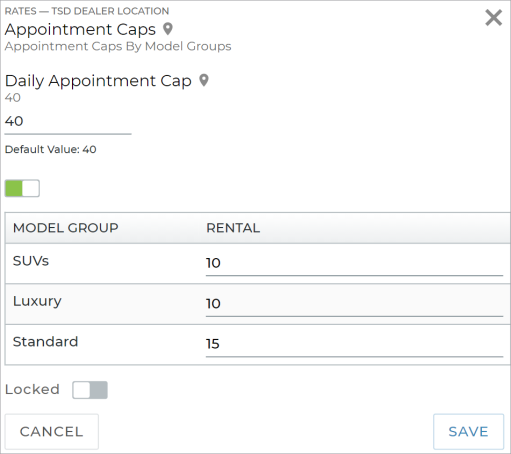
Use the Appointment Caps setting to prevent appointment overbooking by limiting the number of appointments that can be scheduled for pickup on any given day, at locations assigned to this dealership. You can set a cap for all types of appointments, and, if you have Rental appointments, separate caps for each Model Group for rentals.
For example, you can cap all types of appointments to 30, the number of Rental appointments with SUVs at 10, and Sedans at 15.
Appointment Caps are taken into consideration when determining availability on a given day, so review this cap frequently based on your volume of business. If left too high, you risk overbooking; if too low, units may go unused.
By default, the cap is at 40 appointments per day. If you changed this cap to, say, 0, then you would have no availability on a daily basis. We recommend the cap not exceed your location's fleet size, to avoid the possibility of overbooking.
If either the total cap or a Model-specific cap for rentals is met on a Checkout Date, you cannot schedule an appointment with that unit for that date.
Note: Any changes you make only apply to availability, going forward; current booked appointments are not affected. So, if you have 10 booked appointments scheduled for pickup today, and you decrease your Daily Appointment Cap to 8, the 10 appointments are not affected.
Want to be reminded of your Daily Appointment Cap when reviewing appointments in ATMS GEN2.0? Your location's Daily Cap is displayed on your Appointment Operations dashboard. You can click it to access this setting.
What is the recommended Daily Appointment Cap?
What happens when my location's Daily Appointment Cap is reached for a certain date? 
© 2026 TSD Rental, LLC